DT Compatibility: ✅ This mod is compatible with Dawntrail.
(DT) Dreamscape - Gshade / Reshade Preset Pack (Immerse Compatible)
Version: 1.0
Reshade Preset by Elva
;)
Author's Comments:
9/11 - Rendezvous colour isolation toggle adjusted, redownload if need be
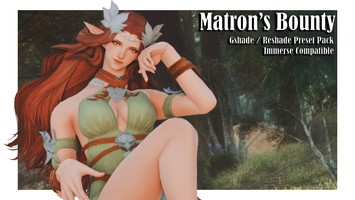
A set of 9 presets with a dreamy, hazy aesthetic! Hope you enjoy!
These have been made in Dawntrail following the graphical update, I have made and tested them in a variety of areas, weather conditions / time of day and skintones. See the previews included for an idea on how they look, some of the various effects and tips.
These have been made in Gshade with both free and paid IMMERSE shaders. If you are having any problems with them in Reshade, please let me know and I will do my best to pinpoint the issue. Original shaders such as MXAO etc have been kept intact as an option for non IMMERSE users.
Please turn off the ingame DOF and adjust the manual brightness as needed! I heavily encourage adjusting and playing around with the different shader toggles included depending on the mood for your photo. Tested on a variety of skintones and weather conditions which will alter how the presets appear. This set was made in the shroud but has been tested in other areas also.
Some presets have colour isolation enabled, you can turn this off for more colours. Please experiment with shader toggles provided.
These come with unique textures too, please ensure they are installed in the: C:\Program Files (x86)\SquareEnix\FINAL FANTASY XIV - A Realm Reborn\game\gshade-shaders\Textures folder to use.
If using the latest GSHADE, the path is different to prevent loss with the update; gshade custom shaders > shaders. Same with custom textures; gshade custom shaders > textures. this has been added to the guide for new gshade users.
There are also some tips in my MEGA folder on using StageDepth shaders and installing immerse. If you are on the latest GSHADE, the base, free Immerse and METEOR by Marty McFly is now installed with the program.
There is also an RTGI option if you use the paid version (immerse Ultimate / Pro).
Please note you must have immerse installed for Immerse functions, original shader toggles have been kept intact as another option! You can find Immerse here: https://github.com/martymcmodding/iMMERSE
To use the Film Grain you will need to download Marty McFly's METEOR extra effects shaders (Free): https://github.com/martymcmodding/METEOR
I have added some keybinds to my presets to easily toggle on and off. All frame textures drawn by myself in Photoshop. Other textures sourced from stock image websites free for public use.
Thank you once again! Please enjoy and if there is something amiss or you have a question, do not hesitate to reach out and I'll do my best to help.
If you are that way inclined to use hashtags when posting pictures, #Elvashade will suffice! It brings me joy seeing people enjoy what I make!
TOS
I am lax about this stuff. You can share these with friends, edit them for your personal use etc just don't upload as your own and don't sell them for monetary gain. If someone asks for them, you are free to share them or redirect to my page.
A set of 9 presets with a dreamy, hazy aesthetic! Hope you enjoy!
These have been made in Dawntrail following the graphical update, I have made and tested them in a variety of areas, weather conditions / time of day and skintones. See the previews included for an idea on how they look, some of the various effects and tips.
These have been made in Gshade with both free and paid IMMERSE shaders. If you are having any problems with them in Reshade, please let me know and I will do my best to pinpoint the issue. Original shaders such as MXAO etc have been kept intact as an option for non IMMERSE users.
Please turn off the ingame DOF and adjust the manual brightness as needed! I heavily encourage adjusting and playing around with the different shader toggles included depending on the mood for your photo. Tested on a variety of skintones and weather conditions which will alter how the presets appear. This set was made in the shroud but has been tested in other areas also.
Some presets have colour isolation enabled, you can turn this off for more colours. Please experiment with shader toggles provided.
These come with unique textures too, please ensure they are installed in the: C:\Program Files (x86)\SquareEnix\FINAL FANTASY XIV - A Realm Reborn\game\gshade-shaders\Textures folder to use.
If using the latest GSHADE, the path is different to prevent loss with the update; gshade custom shaders > shaders. Same with custom textures; gshade custom shaders > textures. this has been added to the guide for new gshade users.
There are also some tips in my MEGA folder on using StageDepth shaders and installing immerse. If you are on the latest GSHADE, the base, free Immerse and METEOR by Marty McFly is now installed with the program.
There is also an RTGI option if you use the paid version (immerse Ultimate / Pro).
Please note you must have immerse installed for Immerse functions, original shader toggles have been kept intact as another option! You can find Immerse here: https://github.com/martymcmodding/iMMERSE
To use the Film Grain you will need to download Marty McFly's METEOR extra effects shaders (Free): https://github.com/martymcmodding/METEOR
I have added some keybinds to my presets to easily toggle on and off. All frame textures drawn by myself in Photoshop. Other textures sourced from stock image websites free for public use.
Thank you once again! Please enjoy and if there is something amiss or you have a question, do not hesitate to reach out and I'll do my best to help.
If you are that way inclined to use hashtags when posting pictures, #Elvashade will suffice! It brings me joy seeing people enjoy what I make!
TOS
I am lax about this stuff. You can share these with friends, edit them for your personal use etc just don't upload as your own and don't sell them for monetary gain. If someone asks for them, you are free to share them or redirect to my page.
Primary File or Link:
Link : [ via mega.nz ]
Other Files and Links:
- Other : [ via github.com ]
- Other : [ via github.com ]
History:
 Loading Mod History...

Similar Mods