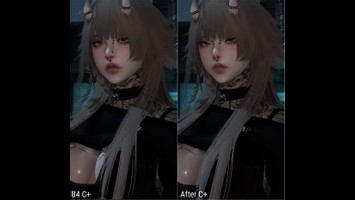
DT Compatibility: ✅ This mod is compatible with Dawntrail.
Sky - Elezen Face Customize+ Sculpt
Version: 1.0
Face by Molo
;)
Contributor Information / AI Usage:
✿ Miette for the hair mod shown in picture
Author's Comments:
A Customize+ preset that I have been working on for a long time for my Elezen! As it is using C+, it is fully customizable to your needs, with the addition of adding mods over it such as makeup (however some parts are drastically scaled so some makeup might not look as good). I will also upload my Glamourer code for the skin tones, makeup colour etc.
How to install C+ template:
- Get Customize+ here if you haven't already https://github.com/Ottermandias/SeaOfStars
- Make sure your Elezen is using Face 4
- Copy the full code below so it is in your clipboard
H4sIAAAAAAAACr2XTW+cMBCGL/0hla9do7ENGDi2VaUcWlVNqn5cVg54Uzd8tHwcomj/e00Kq6hdA/YiThZihnn2nXlt74tH9EEUEiXo+v7h5TuRSrRDb2opWlWVb0Xbv6FAAwwEA7+hNGFB4hMvYoyHwF8BJAA65X2VqYOS2dmUgCWMeYRGHEJySvlcqt+dvMp0uOBxyKOIYM4jhv1bP8QxTQFHMQWSHXQhGeuMq+ZLrVr5sa5ambZSZx5E3kj9okyru1K11bNv6fjXVSkblDyin/vD/ocoxT7vn25qUTb50y/sH7+iBDzYoW/D+v1pPe7Qp6qdD7pORa7KuyGGDDHkFBMfddCpfr2sPj4LgMcw7IjQ9QybKxCN5Qt1L8s9kAVdAD4WoHRCCMotSPT6H0m9lAQbUE4tcUYpxEO3hIPO9wUT7jF3iHwpxMx4ulEUqlAb+JMF/4xn8Kz8JvY0EWh/Nrn6ZdKg/yqw5TLgwG0g/0LUiyFmxHCkyNaUAi5hWE0J7IpR9BhALcwBvpsYehYHipAGRg4Ll5wDWSbIJEpnr8jk3k0nO+MPIH7km0BsJJk80NxJLLszaRiiL3h8OPgifYCbp5UZORb2Zs40l6OQVSThsRc5bacjxEp6uHJk1pZx3U/JgEBNCJucskaKzq4fFx8soDcwE8OGfwfOYRTitlvNIDgcHNhfPKwunyPFOg6xxzge/wDvaU3CBg8AAA==
- Go to the Templates tab in C+
- In the bottom row of icons, click the clipboard one (third from the left)
- Name your template whatever you want
- Go to profiles tab, create a profile with the bottom left plus icon, click "Apply to current character" under the Add
Character tab, select the template in the bottom drop down menu and enable with the top left check mark.
- Done
How to install Glamourer design:
- Get Glamourer here if you haven't already https://github.com/Ottermandias/Glamourer
- Copy the glamourer code below
Bh+LCAAAAAAAAAq8WNtS4zgQ/ZUpvy6hZFm+5Y1bgK3AMkkWHqbmQXHaQYViZy0ZKkPx79uyE+NL8FJbZHhypNN9ulutI4lXayQk3EOmRJpYQ3pkXS8g0SIWkFlDy1mEEAfAB3E4DwfM94JBEMXxgM7d2AlI5Lpkbh1ZZxlwjQ7OuQa0ooS6A2IPiD8jztB1h8w9ZiSkLmF/EDIkBE3GXOmLhdC9cK+C3/KV8ayeNpJn3yT/Bck3ynDiHFSUibVhx3kcGKVZBIsJLDL+Yg1jLhUcWRNQoE8WzzzBufMNqObMDFbrNOPZZgpai2T5Pn2WyjQrHX/PRfSEdGKJTDrLcXbGDfTHzyPrIRMa7rJUQ6RhUZlf/JOL9QoLag1frRsukiue4Oyrda1hdY1ftheQon5KV0Yn67XcNH9NNdo2h5o2WwDZflH8fDuy/orj30t4BbzBxmjIQs+3PfaFnDahTdbTdLFp5EiI43wpod1KE4uq6oyOzWz3kIxjMJ3WTNE93DqOAHSDzqHuQfO74FmzoI7HgsPldwvR074+df3DcaJEKN1IkvrUDg9HOBmhlBkZr+XJHHo4wvHvJrziRZdOH9OXvd4Rci9UWkakZulyKWvi3EI+AF+bQ6TPXyE2SV6s4qXkSpmT5LUcM+kGjDHKQuaFJLQD1rU+y5VOV+IXFAdCugBpzDCtCY+KsXsuc/ygnfAuIVmUtd1C7ApiDqOtDM42a+jDXIFYPuo6grQhZ5InNYDTnh81I2UdCi4ypTeyEQdzOzAMRJpgVB1HgzZu+iSS7Sn8DquVdgu72ECBmrTyc/aF1/bn04+ja2PN8dkpiOByhFegPAO7r/oNJN273PuQTg3Zz84+jXQ/jfQ+jfT7kHiC8Wgz41qnaR+uRLSrTvas9zxLX1TfUu96Ygyx/g/c9JE3Nk6nXacrLuU1SnhfULepgj6iP82V9GPzmzTXj339MxZrpfEW2r9jENUuH+ty5SqScIMS1hCDPcshZLs4nc13iqo23Yrax66McNyhePeuRQWawDO+Soxc93ZfCe5saK8NfQCdQCPZ8gpfRyHsjmf40tDIbJCV/7+fb3KpxVoWz6L3JI9JR6drNnj9xsdFPYE9+HIhZmlSVO8O8PWSaL4s0JSGHWUwzTwWqzmX14mGRAm96Rp2aQpd/B92Rn7PRRznZWfju8rgAp+4QUCxES4zAHMwH/uMEc/D+9PpNlXPsT3iGExXgLseQ+aSMCB1j4HteoHnvHv0Xbym2XSfw0qv60Hu7N9jJMxm5mlQxchCxyXOvhqjKNR8edRnrl1ztRuoPG1/Nx0VVf8ST1uJrRp95y0o4HV3u5HK326goxLdVfCKP1zEyp1L/DAIayVjoY0VK5ZVrh+5GXJsxy/eB02Gc4i4bAdM/YDha6nGYPv4WmMML8I7CmwE6iGr8Vhy2IjymE9a29psH/yXQ4ZHkNmvhYSah5l5kY9F8lReziBOM/RrBk9iRJvPt7d/AQAA//8=
- Go to the Designs tab in Glamourer
- In the bottom row of icons, click the one with the page and arrow pointing to the right (second from the left)
- Call your design whatever you want
- Go to the Automation tab, create a new automation with bottom left plus icon, name the automation whatever you
want, select design in bottom drop down menu
- Done
Enjoy!
How to install C+ template:
- Get Customize+ here if you haven't already https://github.com/Ottermandias/SeaOfStars
- Make sure your Elezen is using Face 4
- Copy the full code below so it is in your clipboard
H4sIAAAAAAAACr2XTW+cMBCGL/0hla9do7ENGDi2VaUcWlVNqn5cVg54Uzd8tHwcomj/e00Kq6hdA/YiThZihnn2nXlt74tH9EEUEiXo+v7h5TuRSrRDb2opWlWVb0Xbv6FAAwwEA7+hNGFB4hMvYoyHwF8BJAA65X2VqYOS2dmUgCWMeYRGHEJySvlcqt+dvMp0uOBxyKOIYM4jhv1bP8QxTQFHMQWSHXQhGeuMq+ZLrVr5sa5ambZSZx5E3kj9okyru1K11bNv6fjXVSkblDyin/vD/ocoxT7vn25qUTb50y/sH7+iBDzYoW/D+v1pPe7Qp6qdD7pORa7KuyGGDDHkFBMfddCpfr2sPj4LgMcw7IjQ9QybKxCN5Qt1L8s9kAVdAD4WoHRCCMotSPT6H0m9lAQbUE4tcUYpxEO3hIPO9wUT7jF3iHwpxMx4ulEUqlAb+JMF/4xn8Kz8JvY0EWh/Nrn6ZdKg/yqw5TLgwG0g/0LUiyFmxHCkyNaUAi5hWE0J7IpR9BhALcwBvpsYehYHipAGRg4Ll5wDWSbIJEpnr8jk3k0nO+MPIH7km0BsJJk80NxJLLszaRiiL3h8OPgifYCbp5UZORb2Zs40l6OQVSThsRc5bacjxEp6uHJk1pZx3U/JgEBNCJucskaKzq4fFx8soDcwE8OGfwfOYRTitlvNIDgcHNhfPKwunyPFOg6xxzge/wDvaU3CBg8AAA==
- Go to the Templates tab in C+
- In the bottom row of icons, click the clipboard one (third from the left)
- Name your template whatever you want
- Go to profiles tab, create a profile with the bottom left plus icon, click "Apply to current character" under the Add
Character tab, select the template in the bottom drop down menu and enable with the top left check mark.
- Done
How to install Glamourer design:
- Get Glamourer here if you haven't already https://github.com/Ottermandias/Glamourer
- Copy the glamourer code below
Bh+LCAAAAAAAAAq8WNtS4zgQ/ZUpvy6hZFm+5Y1bgK3AMkkWHqbmQXHaQYViZy0ZKkPx79uyE+NL8FJbZHhypNN9ulutI4lXayQk3EOmRJpYQ3pkXS8g0SIWkFlDy1mEEAfAB3E4DwfM94JBEMXxgM7d2AlI5Lpkbh1ZZxlwjQ7OuQa0ooS6A2IPiD8jztB1h8w9ZiSkLmF/EDIkBE3GXOmLhdC9cK+C3/KV8ayeNpJn3yT/Bck3ynDiHFSUibVhx3kcGKVZBIsJLDL+Yg1jLhUcWRNQoE8WzzzBufMNqObMDFbrNOPZZgpai2T5Pn2WyjQrHX/PRfSEdGKJTDrLcXbGDfTHzyPrIRMa7rJUQ6RhUZlf/JOL9QoLag1frRsukiue4Oyrda1hdY1ftheQon5KV0Yn67XcNH9NNdo2h5o2WwDZflH8fDuy/orj30t4BbzBxmjIQs+3PfaFnDahTdbTdLFp5EiI43wpod1KE4uq6oyOzWz3kIxjMJ3WTNE93DqOAHSDzqHuQfO74FmzoI7HgsPldwvR074+df3DcaJEKN1IkvrUDg9HOBmhlBkZr+XJHHo4wvHvJrziRZdOH9OXvd4Rci9UWkakZulyKWvi3EI+AF+bQ6TPXyE2SV6s4qXkSpmT5LUcM+kGjDHKQuaFJLQD1rU+y5VOV+IXFAdCugBpzDCtCY+KsXsuc/ygnfAuIVmUtd1C7ApiDqOtDM42a+jDXIFYPuo6grQhZ5InNYDTnh81I2UdCi4ypTeyEQdzOzAMRJpgVB1HgzZu+iSS7Sn8DquVdgu72ECBmrTyc/aF1/bn04+ja2PN8dkpiOByhFegPAO7r/oNJN273PuQTg3Zz84+jXQ/jfQ+jfT7kHiC8Wgz41qnaR+uRLSrTvas9zxLX1TfUu96Ygyx/g/c9JE3Nk6nXacrLuU1SnhfULepgj6iP82V9GPzmzTXj339MxZrpfEW2r9jENUuH+ty5SqScIMS1hCDPcshZLs4nc13iqo23Yrax66McNyhePeuRQWawDO+Soxc93ZfCe5saK8NfQCdQCPZ8gpfRyHsjmf40tDIbJCV/7+fb3KpxVoWz6L3JI9JR6drNnj9xsdFPYE9+HIhZmlSVO8O8PWSaL4s0JSGHWUwzTwWqzmX14mGRAm96Rp2aQpd/B92Rn7PRRznZWfju8rgAp+4QUCxES4zAHMwH/uMEc/D+9PpNlXPsT3iGExXgLseQ+aSMCB1j4HteoHnvHv0Xbym2XSfw0qv60Hu7N9jJMxm5mlQxchCxyXOvhqjKNR8edRnrl1ztRuoPG1/Nx0VVf8ST1uJrRp95y0o4HV3u5HK326goxLdVfCKP1zEyp1L/DAIayVjoY0VK5ZVrh+5GXJsxy/eB02Gc4i4bAdM/YDha6nGYPv4WmMML8I7CmwE6iGr8Vhy2IjymE9a29psH/yXQ4ZHkNmvhYSah5l5kY9F8lReziBOM/RrBk9iRJvPt7d/AQAA//8=
- Go to the Designs tab in Glamourer
- In the bottom row of icons, click the one with the page and arrow pointing to the right (second from the left)
- Call your design whatever you want
- Go to the Automation tab, create a new automation with bottom left plus icon, name the automation whatever you
want, select design in bottom drop down menu
- Done
Enjoy!
Primary File or Link:
SkyPreset.7z : [ via Direct Download ]
Other Files and Links:
- Other : [ via github.com ]
- Other : [ via github.com ]
History:
 Loading Mod History...
Similar Mods

-Noctara- customize+face scale ...
By: yurrrrin
Type: Racial Scaling
Genders: Female
27.1K (23)
4.9K
76