DT Compatibility: ✅ This mod is compatible with Dawntrail.
Glowing Eye Color Picker (DT)
Version: 1.0
Face by atlas.__.
;)
AI Usage: None
Contributor Information:
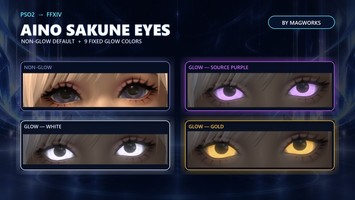
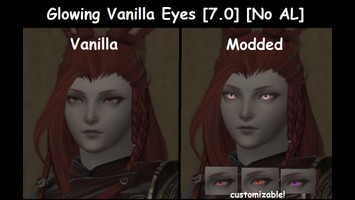
Hi! This is a very simple framework/preset/gallery or whatever you want to call it of different glowing eye colors for all in-game races and genders. I did this originally for myself cause I like rocking different eye colors without having to go edit material constants every time (and ALum has been dead for many months now), I so figured I might expand to all the races and post it so others can make use of it.
I’ll leave a small guide below on how to do your own constant edit, in case you’re not happy with the colors provided, or want black sclera (which you can do in the same menu!)
*I took the screenshots with different GShade presets to show how details, lightning and emissiveness play out with different settings, at the end of the day it all comes down to preference, but this should at least get you started and a bit acquainted with material editing in case you weren't before (which is the whole point of me posting this cause glowing eyes are cool :3)
I’ll leave a small guide below on how to do your own constant edit, in case you’re not happy with the colors provided, or want black sclera (which you can do in the same menu!)
*I took the screenshots with different GShade presets to show how details, lightning and emissiveness play out with different settings, at the end of the day it all comes down to preference, but this should at least get you started and a bit acquainted with material editing in case you weren't before (which is the whole point of me posting this cause glowing eyes are cool :3)
Author's Comments:
This should work with any eyes deemed “glow compatible” or “glow ready” (this means the eye’s mask layer has the red channel or emissive, set up correctly). It’s also fully compatible with sculpts (as long as it’s loaded after the sculpt, since some face sculpts touch the IRI_A material).
Includes 8 different color presets, but you’re free to edit them and change them around however you like. I made the file tree as organized as possible so you don’t need to scramble around looking for codes that match the race and gender.
Colors included:
- Red
- Blue
- Green
- Yellow
- Purple
- Pink
- White
- Light Blue
===== How to change glowing or sclera color: =====
1) Enable the mod, then scroll down the list and select the color you want to use or edit matching your character’s race and gender.
2) Redraw yourself, once you see the color applied on you, open penumbra back up.
3) Head to the Advanced Editing tab
4) Head to the Materials tab, it’s the 5th one from the right.
5) Click on the first black bar, scroll down the list until you see the name of the preset you want, you can identify it by its green color if it’s enabled and showing on you.
6) Expand the “Material Constants” dropdown below, the 5th option from the top is g_EmissiveColor, this is the one you want to edit to change the color on the preset.
7) Pick your color, you can use the palette or exact RGB and HSV values to get the desired effect and glowiness!
8) (OPTIONAL) If you also want a black sclera, under the same Material Constants menu you can scroll down to the g_WhiteEyeColor constant and edit it too! This is the one that tints your sclera so you can turn it black.
9) And you’re done! Remember to click “Save to File” at the top of the Advanced Editing window (below the path of the file you’re currently editing), redraw yourself and voilá!
Do let me know if something is not set up correctly, I checked myself but at one point I was so tired I may have slipped. Feel free to use this and edit it whichever way you want to make your own presets.
Includes 8 different color presets, but you’re free to edit them and change them around however you like. I made the file tree as organized as possible so you don’t need to scramble around looking for codes that match the race and gender.
Colors included:
- Red
- Blue
- Green
- Yellow
- Purple
- Pink
- White
- Light Blue
===== How to change glowing or sclera color: =====
1) Enable the mod, then scroll down the list and select the color you want to use or edit matching your character’s race and gender.
2) Redraw yourself, once you see the color applied on you, open penumbra back up.
3) Head to the Advanced Editing tab
4) Head to the Materials tab, it’s the 5th one from the right.
5) Click on the first black bar, scroll down the list until you see the name of the preset you want, you can identify it by its green color if it’s enabled and showing on you.
6) Expand the “Material Constants” dropdown below, the 5th option from the top is g_EmissiveColor, this is the one you want to edit to change the color on the preset.
7) Pick your color, you can use the palette or exact RGB and HSV values to get the desired effect and glowiness!
8) (OPTIONAL) If you also want a black sclera, under the same Material Constants menu you can scroll down to the g_WhiteEyeColor constant and edit it too! This is the one that tints your sclera so you can turn it black.
9) And you’re done! Remember to click “Save to File” at the top of the Advanced Editing window (below the path of the file you’re currently editing), redraw yourself and voilá!
Do let me know if something is not set up correctly, I checked myself but at one point I was so tired I may have slipped. Feel free to use this and edit it whichever way you want to make your own presets.
History:
 Loading Mod History...

Similar Mods
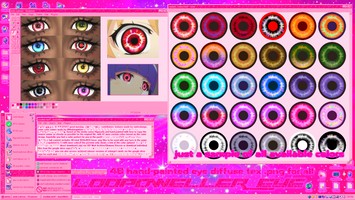
𓊆♡1.1𓊇 LOOPDWELLER EYES by sx...
Type: Face
Genders: Unisex
14.2K (26)
280
15