DT Compatibility: ✅ This mod is compatible with Dawntrail.
[C+ Face Scaling] Larger Eyes, Resting Smile for Hrothgals
Version: 1.0
Racial Scaling by klixse
;)
Author's Comments:
DESCRIPTION
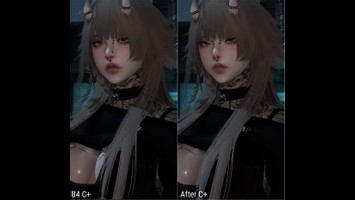
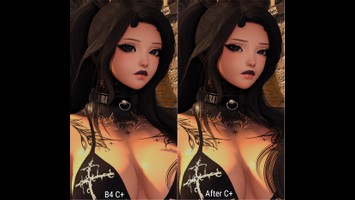
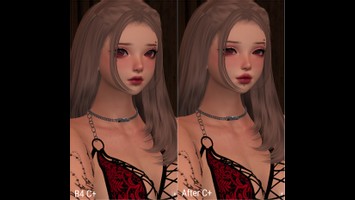
A couple of things I've struggled with are the standard hrothgal resting b*tch face, plus eyes being a bit too small to properly convey the expressions I want to gpose. To combat this, I created some C+ templates to give my character a somewhat pleasant resting smile, adjusted nose bridge, and larger eyes. I thought they turned out nice and wanted to share with anyone else who'd like to give them a try. Eyes, nose, and mouth templates are all separate, so if you want just one or two of the three, it's easy to opt in/out. I ask that you don't reupload/claim these settings as your own, but other than that, go wild. :)
DISCLAIMER
I made this scaling with vanilla face 2 in mind, but I tested it on all the hrothgal faces and with vanilla eyes. I've included my recommended face settings below. Theoretically, it should work alright with any of the face settings, but if it looks odd, you may wish to adjust some of the C+ settings. I tested the scaling with all vanilla facial emotes, some full emotes, and different fang lengths, and everything looked good to go, but your mileage may vary! Even with the resting smile, other emotions like anger/sadness/other smiles still look good - you shouldn't have to worry about smiling at everything. :)
MY FACE SETTINGS
Face: 2
Eyebrows: 1
Eye Shape: 3
Nose: 1
Jaw: 4
Fang Length: 3
HOW TO USE
The download link leads to a notepad file with all three templates - one for eyes, one for nose, and one for mouth. Copy one string of text at a time, open Customize+, go to the Templates tab, and click "Try to import a template from your clipboard." To actually apply a template to your character, go to the Profiles tab, create a profile for your character, and add as many of your templates as you would like.
ME
I have a bluesky account that I use mainly for gposing a mix of SFW and NSFW. https://bsky.app/profile/klixse.bsky.social
INSTALLING CUSTOMIZE+
If you need help installing or using Customize+, I highly recommend Reni's guide here: https://reniguide.carrd.co/#cplusinstall
A couple of things I've struggled with are the standard hrothgal resting b*tch face, plus eyes being a bit too small to properly convey the expressions I want to gpose. To combat this, I created some C+ templates to give my character a somewhat pleasant resting smile, adjusted nose bridge, and larger eyes. I thought they turned out nice and wanted to share with anyone else who'd like to give them a try. Eyes, nose, and mouth templates are all separate, so if you want just one or two of the three, it's easy to opt in/out. I ask that you don't reupload/claim these settings as your own, but other than that, go wild. :)
DISCLAIMER
I made this scaling with vanilla face 2 in mind, but I tested it on all the hrothgal faces and with vanilla eyes. I've included my recommended face settings below. Theoretically, it should work alright with any of the face settings, but if it looks odd, you may wish to adjust some of the C+ settings. I tested the scaling with all vanilla facial emotes, some full emotes, and different fang lengths, and everything looked good to go, but your mileage may vary! Even with the resting smile, other emotions like anger/sadness/other smiles still look good - you shouldn't have to worry about smiling at everything. :)
MY FACE SETTINGS
Face: 2
Eyebrows: 1
Eye Shape: 3
Nose: 1
Jaw: 4
Fang Length: 3
HOW TO USE
The download link leads to a notepad file with all three templates - one for eyes, one for nose, and one for mouth. Copy one string of text at a time, open Customize+, go to the Templates tab, and click "Try to import a template from your clipboard." To actually apply a template to your character, go to the Profiles tab, create a profile for your character, and add as many of your templates as you would like.
ME
I have a bluesky account that I use mainly for gposing a mix of SFW and NSFW. https://bsky.app/profile/klixse.bsky.social
INSTALLING CUSTOMIZE+
If you need help installing or using Customize+, I highly recommend Reni's guide here: https://reniguide.carrd.co/#cplusinstall
Primary File or Link:
klixse-rbf-b-gone.zip : [ via Direct Download ]
Other Files and Links:
- Other : [ via bsky.app ]
- Other : [ via reniguide.carrd.co ]
History:
 Loading Mod History...

Similar Mods